The school year is coming to a close, and this is my last class period. I only have nine minutes to make a farewell post. Great.
I've had fun in this class during the last semester, and though these blog posts have been a bit stressful, I've found that I enjoy writing them. Anyway, now that the sentiment is over...
Our final for this class was an assignment based around the entire semester, so I created a presentation using Google Drive, containing some of my favorite applications that we used, ideas for classes that we should have in our school, a brief idea of which applications I will continue to use after the year is over, and a summary of my blog stats. I will post the link here, and attempt to embed my presentation if possible.
-I'm a link, click me!-
(Turn out I can't embed it, but it can still be access via the link provided. It's the text above this, if you couldn't tell.)
Tuesday, May 20, 2014

Monday, May 19, 2014
Weebly
Weebly is a free online website-building application. You can choose between three templates: Site, Blog, and Store. I created a store, and have not looked at the other two, so I will talk about the store. When you first create your webpage with any template, you will find yourself with a landing page. A store also adds an 'About' page and a 'Contact' page. A UI will appear on the left side of your screen, giving you multiple options for adding modules to your website. A few notable examples include text, images, link buttons, products, Google AdSense, maps, contact forms, slideshows, Youtube videos, a search box, surveys, bookings, polls, forums, and so on. You can also add more pages to your website.
There is a limited amount of items available to free users (Not extremely limited, you can still create a good website), with more available on purchase of a professional membership. It is not extremely expensive, at about $3.29 per month (Or more, depending on what package you choose. Professional is about $6, and business is about $19). A user can invite a friend to the website, and if the friend creates a blog using the email the user sent, both the user and the friend will receive ten dollars on the website to use toward a professional membership. Weebly allows you to choose your domain. Free users follow a '(Name of choice).weebly.com' template, while professional users can choose a custom domain (www.(Name of choice).com/.net/.org).
I set up my store around the fictional Stargate franchise. You can find it here.

There is a limited amount of items available to free users (Not extremely limited, you can still create a good website), with more available on purchase of a professional membership. It is not extremely expensive, at about $3.29 per month (Or more, depending on what package you choose. Professional is about $6, and business is about $19). A user can invite a friend to the website, and if the friend creates a blog using the email the user sent, both the user and the friend will receive ten dollars on the website to use toward a professional membership. Weebly allows you to choose your domain. Free users follow a '(Name of choice).weebly.com' template, while professional users can choose a custom domain (www.(Name of choice).com/.net/.org).
I set up my store around the fictional Stargate franchise. You can find it here.
Wednesday, May 14, 2014
Google Chrome
We've finally downloaded Google Chrome in our class, and our assignment is to create a blog post over the web browser.
Chrome is one of the world's top browsers, preferred by many users. Created by Google, Chrome is a faster, more reliable, and user-friendly browser built around functionality. Users can change the background theme, choose which search engine they wish to use (So you can use Bing in a Google browser. Why would you do that, though?), install extensions ranging from Nicolas Cage to professional screenshot applications and popular games, choose what webpages pop up on startup, and much more. Chrome utilizes the Omnibox, which is a feature that combines the search bar with the address bar. This features irks me, but I am willing to live with it. I do, however, enjoy how easy Google has made downloading files with their browser. This is me favorite feature of Chrome. When you download something, not only will it save to your computer, but the file pops up in the bottom left-hand side of the browser in a special downloads bar. From this bar you can open or run the file, or drag the file into a separate folder/location other than your downloads folder. As a Minecraft mod user, I really appreciate being able to drag the files I download directly into the 'mods' folder rather than searching through thousands of files in my 'Downloads' folder. Benefits over Internet Explorer include speed, functionality, UI, and about everything else. Benefits over Firefox and Safari include functionality and speed.
Now, I will review some of my favorite extensions and other downloads for Google Chrome.
nCage
Well, what did you think? This extension, much like its similar program on Firefox, replaces all images on the internet with photographs of Nicolas Cage's face.
Google Dictionary/Google Translate
These are two separate extensions, but I feel they would fit into one review because they fit together so well. Google Dictionary allows you to look up any word you do not understand in a special Google dictionary, including fictional words such as Google and Stargate. Google Translate allows the user to translate any words on a webpage into any real language that they wish to translate it into.
Cut the Rope
As I undoubtedly forgot to mention (I'm not going back and checking), you can install games for Chrome as well. Cut the Rope is a good example of a small, yet popular game that you can install. You must cut a rope and collect three golden stars, then deliver the candy that was attached to the rope to the frog creature in order for it to be ingested.
You can also install background themes to further customize Google Chrome. Chrome can remember your passwords, but only if you tell it to. Chrome allows the user to see the HTML code for a website, and edit it. Edits won't be saved, but it can be funny. I have only explained a small corner of what you can do with Chrome, so feel free to explore, and maybe find secrets that I haven't yet!
Chrome is one of the world's top browsers, preferred by many users. Created by Google, Chrome is a faster, more reliable, and user-friendly browser built around functionality. Users can change the background theme, choose which search engine they wish to use (So you can use Bing in a Google browser. Why would you do that, though?), install extensions ranging from Nicolas Cage to professional screenshot applications and popular games, choose what webpages pop up on startup, and much more. Chrome utilizes the Omnibox, which is a feature that combines the search bar with the address bar. This features irks me, but I am willing to live with it. I do, however, enjoy how easy Google has made downloading files with their browser. This is me favorite feature of Chrome. When you download something, not only will it save to your computer, but the file pops up in the bottom left-hand side of the browser in a special downloads bar. From this bar you can open or run the file, or drag the file into a separate folder/location other than your downloads folder. As a Minecraft mod user, I really appreciate being able to drag the files I download directly into the 'mods' folder rather than searching through thousands of files in my 'Downloads' folder. Benefits over Internet Explorer include speed, functionality, UI, and about everything else. Benefits over Firefox and Safari include functionality and speed.
Now, I will review some of my favorite extensions and other downloads for Google Chrome.
nCage
Well, what did you think? This extension, much like its similar program on Firefox, replaces all images on the internet with photographs of Nicolas Cage's face.
Google Dictionary/Google Translate
These are two separate extensions, but I feel they would fit into one review because they fit together so well. Google Dictionary allows you to look up any word you do not understand in a special Google dictionary, including fictional words such as Google and Stargate. Google Translate allows the user to translate any words on a webpage into any real language that they wish to translate it into.
Cut the Rope
As I undoubtedly forgot to mention (I'm not going back and checking), you can install games for Chrome as well. Cut the Rope is a good example of a small, yet popular game that you can install. You must cut a rope and collect three golden stars, then deliver the candy that was attached to the rope to the frog creature in order for it to be ingested.
You can also install background themes to further customize Google Chrome. Chrome can remember your passwords, but only if you tell it to. Chrome allows the user to see the HTML code for a website, and edit it. Edits won't be saved, but it can be funny. I have only explained a small corner of what you can do with Chrome, so feel free to explore, and maybe find secrets that I haven't yet!
Thursday, May 8, 2014
Smore
Smore is a free to use website that allows you to create a promotional banner/advertisement for your company, class, small group, etc. There are many options available to you, notably images, text, contact areas, events, videos, image/video galleries, and an embedding area. I had absolutely no idea what I could do with it at the moment (Not saying that it isn't useful; I just have nothing to advertise with it), so I created a banner/advertisement for the Yogscast's Honeydew Inc. Jaffa Cake factory.
"If you kinda squint and imagine, then you can get a taste of home!" ~Sjin
"If you kinda squint and imagine, then you can get a taste of home!" ~Sjin
Story Jumper
Story Jumper is a website that allows you to create a book using text and images. It is completely free to use. When your story is complete, you can share it with the world. You can also opt to purchase a hard copy of your book, or another book that you enjoyed.
My class created stories, with at least 10 pages each. I created a wall of words on each page, but since it has six pages like that, it counts as 10. I really overdid my story, but I plan on finishing it. Feel free to check out my classmates' stories as well as mine!
Criticism is appreciated, as I write often. This is not my best work, but I still like it.
My class created stories, with at least 10 pages each. I created a wall of words on each page, but since it has six pages like that, it counts as 10. I really overdid my story, but I plan on finishing it. Feel free to check out my classmates' stories as well as mine!
 |
| Visit Story Jumper here! |
 |
| Main character in my story that I really overdid. Read it here! |
Tuesday, May 6, 2014
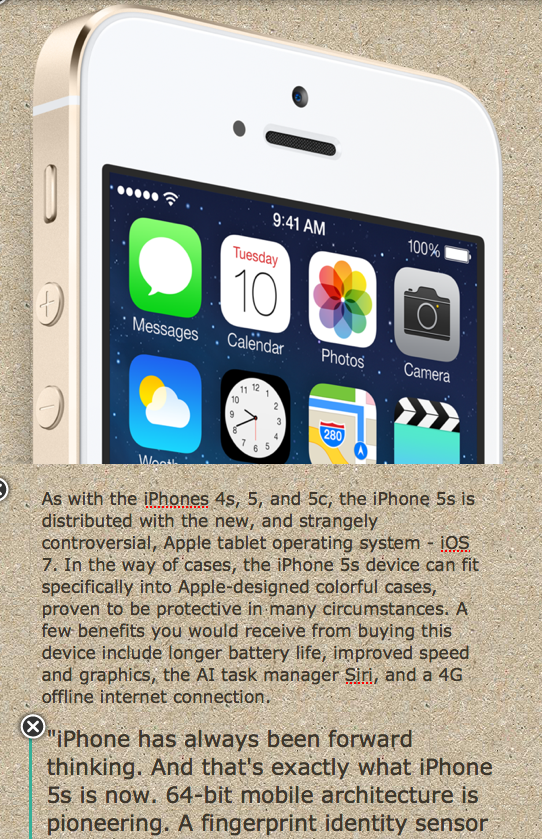
Infographic: iPhone 5s
Create an infographic similar to mine on Infogram.

 |
| My infograph, uploaded in the form of three screenshots due to the HTML code being unresponsive. |
Wednesday, April 30, 2014
Animoto
Animoto is a website that allows you to create short video clips with images, as well as video and audio clips. You can make a 30 second clip for free, but you are required to pay $5 a month to access all features, including unlimited video length and amount of pictures. You can visit Animoto here.
The Doctor
I made a video with all of the Doctors from Bill to Matt, excluding John Hurt. I had to exclude John and Peter Capaldi due to time and picture constraints.
The Doctor
I made a video with all of the Doctors from Bill to Matt, excluding John Hurt. I had to exclude John and Peter Capaldi due to time and picture constraints.
Monday, April 28, 2014

Go2Web20
Go2Web20 is a website that collects information on useful web applications, as well as providing a link to the corresponding websites. I will be reviewing two applications that I believe will widely benefit the public.

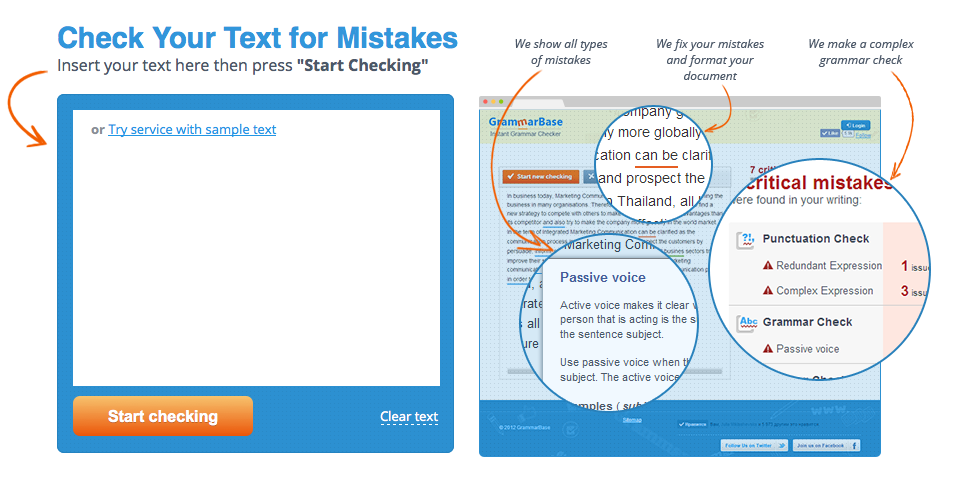
GrammarBase is a free website that will find and point out errors in your grammar and syntax. You will be notified about your spelling errors, and what your mistakes were, in the text box. GrammarBase will also correct all of your issues in a 3, 6, or 12 hour deadline for
$15.45 per body of text. This paid feature is not necessary, and the original function mentioned before is completely free to the user. I will be using this website to correct any mistakes I may have made in this blog post.
Webs is an application that I am very familiar with, as I have used it in the past. Webs is a free website building application, which allows you 40MB of free space, and 500MB of bandwidth per month. You must create an account to build a website. If one were to add a membership panel to the website, users (Meaning you have an account) can join this website as a member. The constructor contains multiple templates, and allows you to add things such as text, images, HTML, buttons, member features, donation areas, new tabs, and much more. A while back, I was messing around with Webs, and created a website for a group on the MMOG ROBLOX, called State Building Inc. I will post the link here so you can check out my work.

-Visit Go2Web20 here-
Tuesday, April 22, 2014
Firefox Add-ons
Such screenshots much piano very cage wow!
So, after about five minutes of looking through themes, and then about ten goofing around and wishing I could take screenshots, I realized that I could just use Firefox's Add-ons features to find a screen capture plugin.
The first thing I did, however, was search for a personal favorite that I discovered on Google Chrome - NicCage. NicCage is an extension that changes every picture on any given webpage into a picture of Nicholas Cage. It's as simple as that, but so, so amusing. You can find NicCage here.
The second extension I searched for was the Nimbus Screen Capture extension. Well, I didn't search specifically for that one, but I found it anyway. NSC not only allows you to create a screenshot of your webpage, but it also allows you to then edit said screenshot and save it as an image, or to another website. I used it to take this picture:
 You can find Nimbus Screen Capture here.
Another extension I viewed, and the last I will review, is the Play Your Piano! extension. This extension requires you to restart Firefox, but is definitely worth it. To activate this extension, you must click on "Tools" and select it from there. When it is selected, you may or may not notice that tapping on the number keys (Only the ones in the main keyboard section, the number pad will not work) will play a note as pressing a key on a piano would. I managed to annoy the people next to me by repeatedly playing "46964696469964696" (Which you may recognize once you play it out). You can find Play Your Piano! here.
So, after about five minutes of looking through themes, and then about ten goofing around and wishing I could take screenshots, I realized that I could just use Firefox's Add-ons features to find a screen capture plugin.
The first thing I did, however, was search for a personal favorite that I discovered on Google Chrome - NicCage. NicCage is an extension that changes every picture on any given webpage into a picture of Nicholas Cage. It's as simple as that, but so, so amusing. You can find NicCage here.
The second extension I searched for was the Nimbus Screen Capture extension. Well, I didn't search specifically for that one, but I found it anyway. NSC not only allows you to create a screenshot of your webpage, but it also allows you to then edit said screenshot and save it as an image, or to another website. I used it to take this picture:
Another extension I viewed, and the last I will review, is the Play Your Piano! extension. This extension requires you to restart Firefox, but is definitely worth it. To activate this extension, you must click on "Tools" and select it from there. When it is selected, you may or may not notice that tapping on the number keys (Only the ones in the main keyboard section, the number pad will not work) will play a note as pressing a key on a piano would. I managed to annoy the people next to me by repeatedly playing "46964696469964696" (Which you may recognize once you play it out). You can find Play Your Piano! here.
Firefox Personas
Firefox is a semi-popular and well known alternative web browser which allows you to personalize your experience. Today we messed around with personas, or background images. When you download a persona (By clicking on the green "Add+" button), the new image will not change the background of the webpages, but instead the actual browser bar at the top, like in Google Chrome. There are many personas, listed officially as themes, available, most to all created by your fellow browser users. My current theme is a wide-angle shot of the lost city of Atlantis (Stargate: Atlantis). I would include a screenshot, but sadly, I cannot take screenshots in Firefox.
You can download your own theme here.
You can download your own theme here.
Thursday, April 17, 2014
Gickr
Gickr is a website that allows you to quickly turn up to 10 pictures into an animated slideshow/GIF. All you need to do is upload your photos, and press continue. You can then copy the HTML or BB code, as well as the image link, or you can download it to your computer or a social media website. It will originally have four upload slots, but you can click on the "Add one more" button to add another. The button stays even after 10 uploads, but the warning at the top always says that the maximum is 10 files.
 |
| This is a slideshow of my Spock pictures on other bodies. I call it PhotoSpocking. I may also do some Frodoshopping, but who knows. |
Tuesday, April 15, 2014
Study Stack
Study Stack is a website that allows you to create a set of flash cards, or learn from somebody else's. This is not all it does. There are many other options for studying, such as "Chopped", "Hungry Bug", "Hangman", "Crossword", and "Test", to name a few. I created a set of cards listing Spanish food vocabulary.
Friday, April 11, 2014
Random Name/Word Chooser
This website allows you to add names or words to a list, and it will randomly choose one.
You could always use my example to choose whose blog you will check next.
Word Search Maker
The words correspond with the last names of the actors who have played The Doctor. This website allows you to input custom words, and it will show you where it places them. You can then embed your word search, well, anywhere that allows for HTML coding.
Wednesday, April 9, 2014
ProfPros Hangman
I created a simple Hangman game with ProfPros.com, feel free to check them out.
WARNING: After the first word, single-letter lines are always "R" and all words begin with "N". This is a bug that I do not understand. It also tells me that the game does not exist when I edit it, so I cannot find any way to correct the error. EDIT: The words are the last names of doctors/actors who played the Doctor in Doctor Who, Star Trek, and Stargate.
WARNING: After the first word, single-letter lines are always "R" and all words begin with "N". This is a bug that I do not understand. It also tells me that the game does not exist when I edit it, so I cannot find any way to correct the error. EDIT: The words are the last names of doctors/actors who played the Doctor in Doctor Who, Star Trek, and Stargate.
Monk-e-Mail
Monk-e-Mail id a free service which allows you to send a personalized message in the form of a talking monkey. You can choose between three different monkeys, with multiple customizable items and backgrounds. Create your own Monk-e-Mail here.

Monday, April 7, 2014
TeacherWeb 2.0
[Post Reserved]
[I knew I promised to leave the blog without a reserved post, but I sorta ran out of time for this. It's alright, the post isn't due until Wednesday, so stick with me.]
[Break out the cookies and milk once again whilst you wait.]
[I knew I promised to leave the blog without a reserved post, but I sorta ran out of time for this. It's alright, the post isn't due until Wednesday, so stick with me.]
[Break out the cookies and milk once again whilst you wait.]
Photo Editors - FotoFlexer
Okay guys, I have 20 minutes to finish this, so I won't leave you with another reserved post.
During the last two class periods, we were given a list of free photo editors to explore, and four of those were assigned to us to write a blog post around. The four websites listed were PiZap, Bloggif, PhotoFunia, and FotoFlexer. The only picture of a face that I currently have on this computer is Spock, so you can tell how interesting this will be. The final website I will showcase today is FotoFlexer.
FotoFlexer is more of a photo editor than the rest. All of the others let you add things, but FotoFlexer allows you to change things. You have to upload a picture for this to work, just as you would all of the others. FotoFlexer gives you the power to correct red eyes, remove wrinkles, fix blemishes, sharpen and smoothen the picture, expand, compress, and twist images, add animations and animated text, use filters, and much more. Though I don't recommend trying the Smart Scissors. Before I go to my... pictures... yeah, that's what they are, I have to mention the classic flip tools, copy and paste region tools, auto fix, resize tools, and the handy-dandy crop tool. Again, I really can't explain everything, because there is just too much to explain, so I will let you explore the features (I did list most of them, save stickers and such). Now I'll show you my... creations.
-Visit FotoFlexer here-
4/4
During the last two class periods, we were given a list of free photo editors to explore, and four of those were assigned to us to write a blog post around. The four websites listed were PiZap, Bloggif, PhotoFunia, and FotoFlexer. The only picture of a face that I currently have on this computer is Spock, so you can tell how interesting this will be. The final website I will showcase today is FotoFlexer.
FotoFlexer is more of a photo editor than the rest. All of the others let you add things, but FotoFlexer allows you to change things. You have to upload a picture for this to work, just as you would all of the others. FotoFlexer gives you the power to correct red eyes, remove wrinkles, fix blemishes, sharpen and smoothen the picture, expand, compress, and twist images, add animations and animated text, use filters, and much more. Though I don't recommend trying the Smart Scissors. Before I go to my... pictures... yeah, that's what they are, I have to mention the classic flip tools, copy and paste region tools, auto fix, resize tools, and the handy-dandy crop tool. Again, I really can't explain everything, because there is just too much to explain, so I will let you explore the features (I did list most of them, save stickers and such). Now I'll show you my... creations.
 |
| This is my picture of Spock on the moon. I cropped it, and used the "Wrinkle Remover" tool to make the background fuzzy. Sure makes the flag stand out, but that was the point. This isn't the picture I'm worried about. |
 |
| This is the picture that makes me worry for my mental health. I expanded his eyes vertically, and his mouth horizontally. I then tried to use the Smart Scissors tool to cut Spock out of the White House background, but failed. Horribly. Then I flipped the image upside-down to make it that much more interesting. And thus this picture was born. |
-Visit FotoFlexer here-
4/4
Photo Editors - PhotoFunia
During the last two class periods, we were given a list of free photo editors to explore, and four of those were assigned to us to write a blog post around. The four websites listed were PiZap, Bloggif, PhotoFunia, and FotoFlexer. The only picture of a face that I currently have on this computer is Spock, so you can tell how interesting this will be. The website that I will be showcasing this time is PhotoFunia, which I had way too much fun with.
PhotoFunia isn't too complex. You choose from a wide variety of backgrounds or faceless bodies and smack your picture on top of the background, or a face onto the body. I didn't even see all of the effects. There are a lot. You can even add text to specified backgrounds, such as a wanted poster, or a directional sign post. This is practically all I've been able to get out of PhotoFunia at this time, but I'm sure that you'll enjoy it, and probably find things that I missed. I'll showcase some of my aforementioned Spock photos here.
-Visit PhotoFunia here-
3/4
PhotoFunia isn't too complex. You choose from a wide variety of backgrounds or faceless bodies and smack your picture on top of the background, or a face onto the body. I didn't even see all of the effects. There are a lot. You can even add text to specified backgrounds, such as a wanted poster, or a directional sign post. This is practically all I've been able to get out of PhotoFunia at this time, but I'm sure that you'll enjoy it, and probably find things that I missed. I'll showcase some of my aforementioned Spock photos here.
 |
| Because who doesn't want a gangster Spock picture alternating around their desktop? |
 |
| Okay, so I really have no idea what to say about this. But it's Spock on Captain Jack Sparrow's body, so it's cool. |
 |
| This one allows you to change the team name and number, so I suppose I could have made him 1337. |
 |
| Jedi Spock. This combines two of the best things in the known- and unknown -universe. |
 |
| Because we all know that Spock was really the first man on the moon. Actually, I think this was a picture of Buzz Aldrin, so Neil still beat Spock. The flag changes to the country that you are in, which I find extremely annoying. I guess that's just my need to be historically correct pushing its way through. |
 |
| This picture speaks for itself. |
-Visit PhotoFunia here-
3/4
Subscribe to:
Posts (Atom)