Animoto is a website that allows you to create short video clips with images, as well as video and audio clips. You can make a 30 second clip for free, but you are required to pay $5 a month to access all features, including unlimited video length and amount of pictures. You can visit Animoto here.
The Doctor
I made a video with all of the Doctors from Bill to Matt, excluding John Hurt. I had to exclude John and Peter Capaldi due to time and picture constraints.
Wednesday, April 30, 2014

Monday, April 28, 2014
Go2Web20
Go2Web20 is a website that collects information on useful web applications, as well as providing a link to the corresponding websites. I will be reviewing two applications that I believe will widely benefit the public.

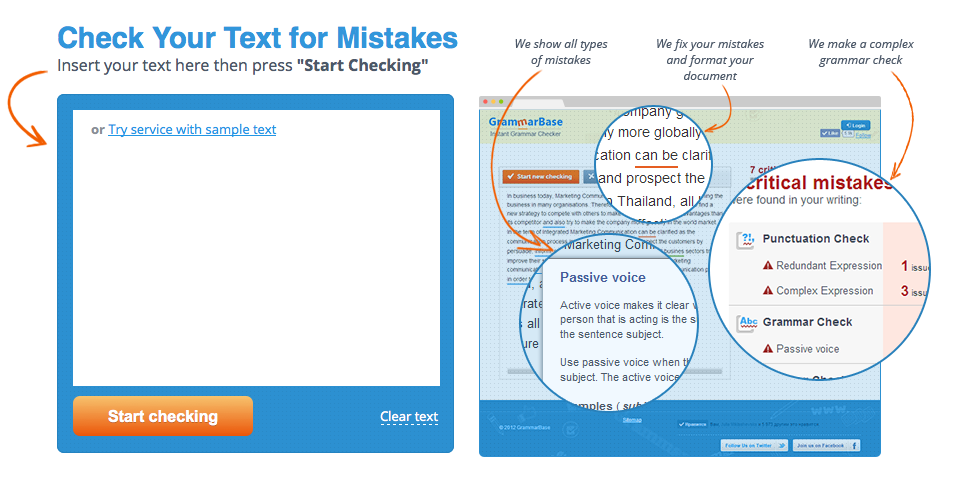
GrammarBase is a free website that will find and point out errors in your grammar and syntax. You will be notified about your spelling errors, and what your mistakes were, in the text box. GrammarBase will also correct all of your issues in a 3, 6, or 12 hour deadline for
$15.45 per body of text. This paid feature is not necessary, and the original function mentioned before is completely free to the user. I will be using this website to correct any mistakes I may have made in this blog post.
Webs is an application that I am very familiar with, as I have used it in the past. Webs is a free website building application, which allows you 40MB of free space, and 500MB of bandwidth per month. You must create an account to build a website. If one were to add a membership panel to the website, users (Meaning you have an account) can join this website as a member. The constructor contains multiple templates, and allows you to add things such as text, images, HTML, buttons, member features, donation areas, new tabs, and much more. A while back, I was messing around with Webs, and created a website for a group on the MMOG ROBLOX, called State Building Inc. I will post the link here so you can check out my work.

-Visit Go2Web20 here-
Tuesday, April 22, 2014
Firefox Add-ons
Such screenshots much piano very cage wow!
So, after about five minutes of looking through themes, and then about ten goofing around and wishing I could take screenshots, I realized that I could just use Firefox's Add-ons features to find a screen capture plugin.
The first thing I did, however, was search for a personal favorite that I discovered on Google Chrome - NicCage. NicCage is an extension that changes every picture on any given webpage into a picture of Nicholas Cage. It's as simple as that, but so, so amusing. You can find NicCage here.
The second extension I searched for was the Nimbus Screen Capture extension. Well, I didn't search specifically for that one, but I found it anyway. NSC not only allows you to create a screenshot of your webpage, but it also allows you to then edit said screenshot and save it as an image, or to another website. I used it to take this picture:
 You can find Nimbus Screen Capture here.
Another extension I viewed, and the last I will review, is the Play Your Piano! extension. This extension requires you to restart Firefox, but is definitely worth it. To activate this extension, you must click on "Tools" and select it from there. When it is selected, you may or may not notice that tapping on the number keys (Only the ones in the main keyboard section, the number pad will not work) will play a note as pressing a key on a piano would. I managed to annoy the people next to me by repeatedly playing "46964696469964696" (Which you may recognize once you play it out). You can find Play Your Piano! here.
So, after about five minutes of looking through themes, and then about ten goofing around and wishing I could take screenshots, I realized that I could just use Firefox's Add-ons features to find a screen capture plugin.
The first thing I did, however, was search for a personal favorite that I discovered on Google Chrome - NicCage. NicCage is an extension that changes every picture on any given webpage into a picture of Nicholas Cage. It's as simple as that, but so, so amusing. You can find NicCage here.
The second extension I searched for was the Nimbus Screen Capture extension. Well, I didn't search specifically for that one, but I found it anyway. NSC not only allows you to create a screenshot of your webpage, but it also allows you to then edit said screenshot and save it as an image, or to another website. I used it to take this picture:
Another extension I viewed, and the last I will review, is the Play Your Piano! extension. This extension requires you to restart Firefox, but is definitely worth it. To activate this extension, you must click on "Tools" and select it from there. When it is selected, you may or may not notice that tapping on the number keys (Only the ones in the main keyboard section, the number pad will not work) will play a note as pressing a key on a piano would. I managed to annoy the people next to me by repeatedly playing "46964696469964696" (Which you may recognize once you play it out). You can find Play Your Piano! here.
Firefox Personas
Firefox is a semi-popular and well known alternative web browser which allows you to personalize your experience. Today we messed around with personas, or background images. When you download a persona (By clicking on the green "Add+" button), the new image will not change the background of the webpages, but instead the actual browser bar at the top, like in Google Chrome. There are many personas, listed officially as themes, available, most to all created by your fellow browser users. My current theme is a wide-angle shot of the lost city of Atlantis (Stargate: Atlantis). I would include a screenshot, but sadly, I cannot take screenshots in Firefox.
You can download your own theme here.
You can download your own theme here.
Thursday, April 17, 2014
Gickr
Gickr is a website that allows you to quickly turn up to 10 pictures into an animated slideshow/GIF. All you need to do is upload your photos, and press continue. You can then copy the HTML or BB code, as well as the image link, or you can download it to your computer or a social media website. It will originally have four upload slots, but you can click on the "Add one more" button to add another. The button stays even after 10 uploads, but the warning at the top always says that the maximum is 10 files.
 |
| This is a slideshow of my Spock pictures on other bodies. I call it PhotoSpocking. I may also do some Frodoshopping, but who knows. |
Tuesday, April 15, 2014
Study Stack
Study Stack is a website that allows you to create a set of flash cards, or learn from somebody else's. This is not all it does. There are many other options for studying, such as "Chopped", "Hungry Bug", "Hangman", "Crossword", and "Test", to name a few. I created a set of cards listing Spanish food vocabulary.
Friday, April 11, 2014
Random Name/Word Chooser
This website allows you to add names or words to a list, and it will randomly choose one.
You could always use my example to choose whose blog you will check next.
Word Search Maker
The words correspond with the last names of the actors who have played The Doctor. This website allows you to input custom words, and it will show you where it places them. You can then embed your word search, well, anywhere that allows for HTML coding.
Wednesday, April 9, 2014
ProfPros Hangman
I created a simple Hangman game with ProfPros.com, feel free to check them out.
WARNING: After the first word, single-letter lines are always "R" and all words begin with "N". This is a bug that I do not understand. It also tells me that the game does not exist when I edit it, so I cannot find any way to correct the error. EDIT: The words are the last names of doctors/actors who played the Doctor in Doctor Who, Star Trek, and Stargate.
WARNING: After the first word, single-letter lines are always "R" and all words begin with "N". This is a bug that I do not understand. It also tells me that the game does not exist when I edit it, so I cannot find any way to correct the error. EDIT: The words are the last names of doctors/actors who played the Doctor in Doctor Who, Star Trek, and Stargate.
Subscribe to:
Posts (Atom)